icon-risafloor
RISAFloor
The Essential Tool for Multi-Story Buildings

Version 19 | $1,680/yr

Intuitive-Floor-Based-Modeling-Environment-1
Automated-Floor-Loading-_-Optimization
Integrated-Concrete-Floor-Analysis-_-Design
risa-icon-wht-1

Reach an Engineer

Connect with the Experts.
We have the engineering staff ready to assist you.

  • Modeling
  • Loading
  • Analysis
  • Design
  • Results & Reporting
  • Integration & BIM
  • Elevated Slab

RISAFloor’s interface creates an intuitive floor-by-floor modeling environment for straightforward multi-story building creation. Quickly model floor elements using a DXF overlay, construction lines, and combination of spreadsheet input and CAD-like modeling. In addition, parent/child floor relationships let you mimic one floor’s layout within another, eliminating repetitive modeling and modifications. Quickly navigate large models using powerful graphical select/unselect tools and saved selections.

Features:

  • Multiple Diaphragms

  • Object Snaps

  • Drawing Grids & Construction Lines

  • Beam Infill Generation

  • Parent/Child Floors 

Easily apply and edit floor loads in RISAFloor graphically or through interactive spreadsheets. Assign default floor area loads based on typical load categories to quickly create floor loading for multistory buildings. Incorporate skip loading for columns and beams to evaluate the worst-case unbalanced loading. Automatically generate code based load combinations or create your own.

Features

  • Point, Line, Moment & Surface Loads

  • One & Two Way Area Loads

  • Uniform/Tapered Wall Loads

  • Smart Area Loads

RISAFloor utilizes finite element analysis to solve multi-story models in no time. Engineers can utilize various deck/diaphragm types, automatic live load reduction and vibration considerations in order to design various types of multi-story buildings.

Features

  • Finite Element Analysis

  • Live Load Reductions

  • Rigid/Semi Rigid/Flexible Diaphragms

  • Continuous/Cantilevered Beam Spans

  • Column Stacks & Splices

Design and optimize members using hot rolled steel (composite and non-composite), concrete, cold formed steel, steel joists (composite and non-composite), wood, wood joists and masonry. Establish design rules to properly optimize members per code, size restrictions and deflection criteria.

Features

  • Design Rules (Member & Wall)

  • Material Design Databases

  • Optimization Routines

  • Automated Unbraced Length

  • Wall Panel Studs & Fasteners

With the analysis and design complete, design results are readily available graphically, in spreadsheets, and in detailed reports. Present color-coded member results and designs on screen. Utilize interactive spreadsheet results to review designs, code checks, moments, deflections, and much more. When refinement is needed, enable selection states to exclude elements from results, making visualization and redesign a breeze.

Features

  • Forces & Code Checks

  • Relative and Absolute Beam Deflections

  • Skip Loading

  • Member Detailed Reports

  • Filter Results

  • Reinforcement Export

Collaboration is an essential element of the design process. With RISA, engineers are able to seamlessly exchange model information between RISAFloor, RISA-3D, RISAFoundation and RISAConnection for the complete design of any structure. Additionally, engineers looking to work cohesively with architects can easily integrate Autodesk Revit models with RISAFloor using the RISA-Revit Link.

Features:

  • Load tracking between all RISA products

  • Definition of specific gravity/lateral members for design evaluation

  • Assignment of steel connections for design

  • Inclusion of model geometry, loading and reactions within Revit Integration

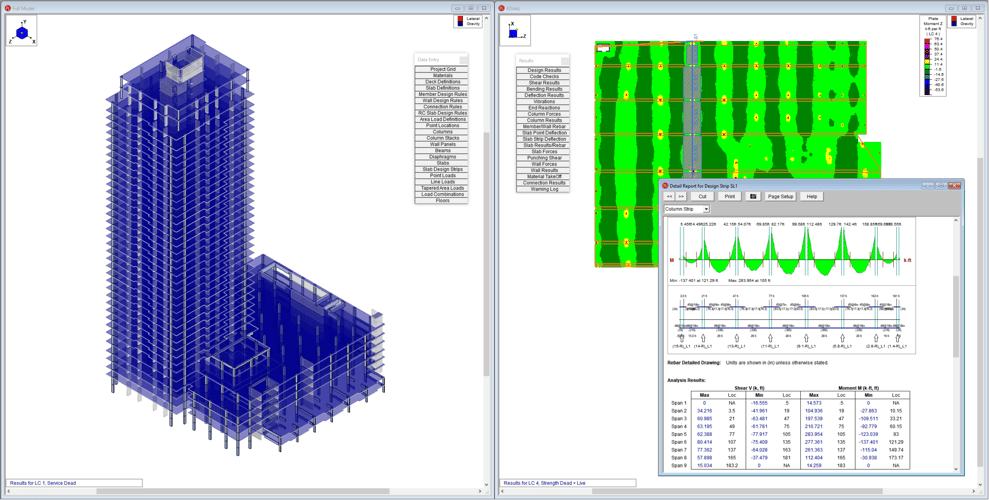
RISAFloor ES includes all the beam supported floor functionality found in RISAFloor plus the capability to design elevated concrete slabs. Use RISAFloor ES to manually or automatically generate design strips to design one-way and two-way concrete slabs, beams, and girders. Utilize finite element analysis to evaluate long-term deflections including creep. Easily assign and analyze slabs as rigid or semi-rigid diaphragms.

Features:

  • Automated Design Strips

  • Member & Slab Reinforcement Design

  • Custom Rebar Layouts

  • DXF Export of Reinforcement

  • Column Punching Shear Design

  • Cracked Section Analysis

CUSTOMER SPOTLIGHT

Designing a new 9-story cast-in-place concrete building brings unique challenges. The structure boasts a two-way slab design, highlighted by spacious cantilevered balconies stretching up to 12 feet and a rooftop pool.

Harrison Hamnett Structural Engineers

parallax image

RISAFloor Support Resources

icons-videos

Videos

icons-codes

Design Codes

Frequently Asked Questions

Can’t find any answer for your question?
Ask our Customer Support

What is RISAFloor used for?

RISAFloor is used to model and design entire building structures, focusing on gravity systems and integrating seamlessly with RISA-3D for lateral analysis.

How does RISAFloor integrate with RISA-3D?

RISAFloor automatically transfers load paths, geometry, and materials to RISA-3D, allowing engineers to analyze lateral systems without rebuilding the model.

Can I design composite floors in RISAFloor?

Yes, RISAFloor supports both composite and non-composite steel beam design using the latest AISC specifications.

Does RISAFloor handle multi-story buildings?

Yes, you can easily model and design multi-story structures with consistent column lines, floor levels, and gravity loads.

Can I export RISAFloor models to Revit or Tekla?

Yes, RISAFloor offers BIM integration through the RISA-Revit Link and Tekla Link for seamless collaboration with architects and other engineers.